ZoomMultistompZDL
Installing ZDLs With Zoom Effect Manager
The release .ZDL files are in ../dist/. Use
Zoom Effect Manager 2.3.3 or
newer and point it at that folder.
Steps
- Connect the pedal first, then open Zoom Effect Manager.
- Open
Settings. - Choose
Read Effects from folder. - Select this repo’s
dist/folder.
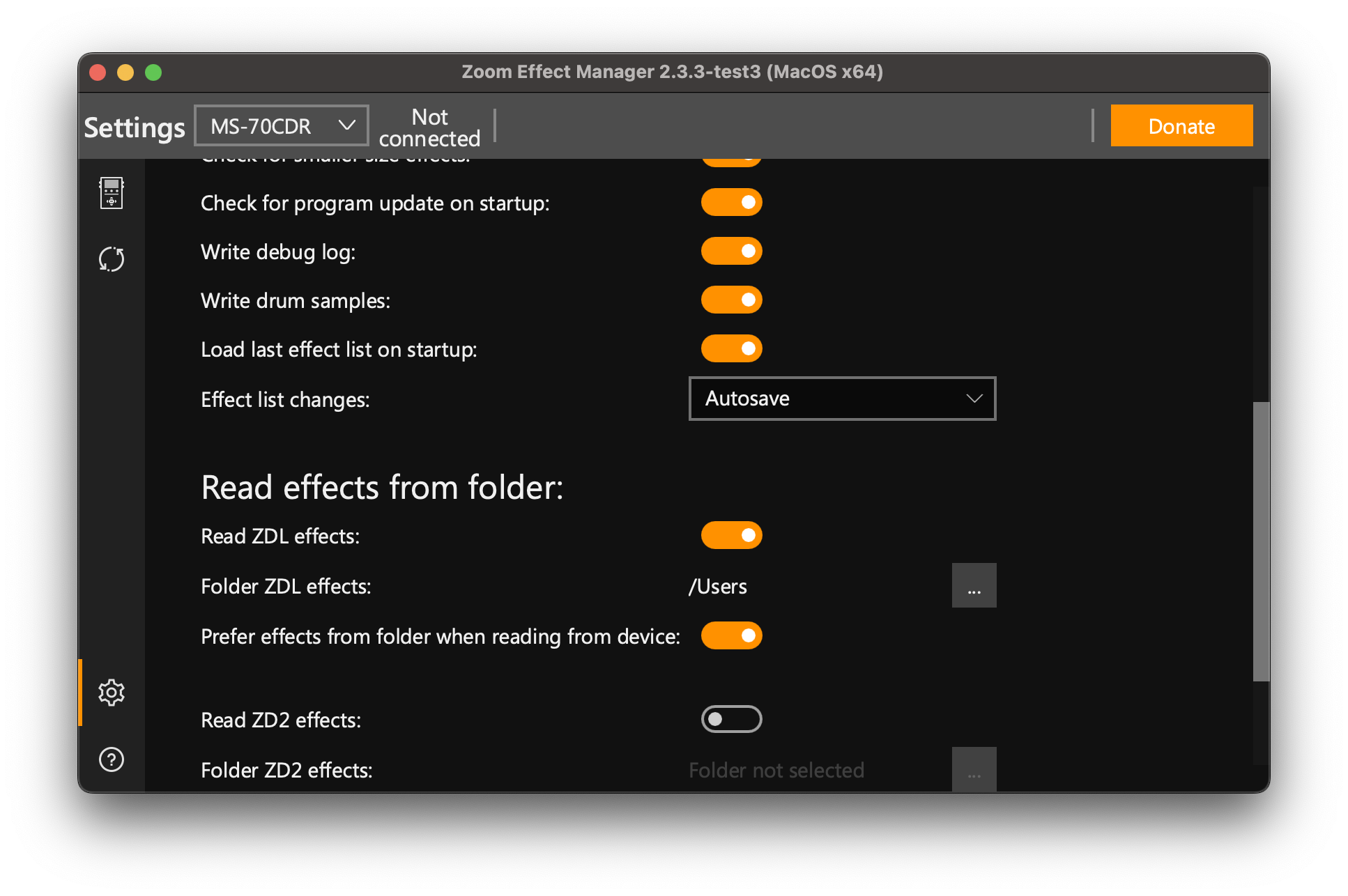
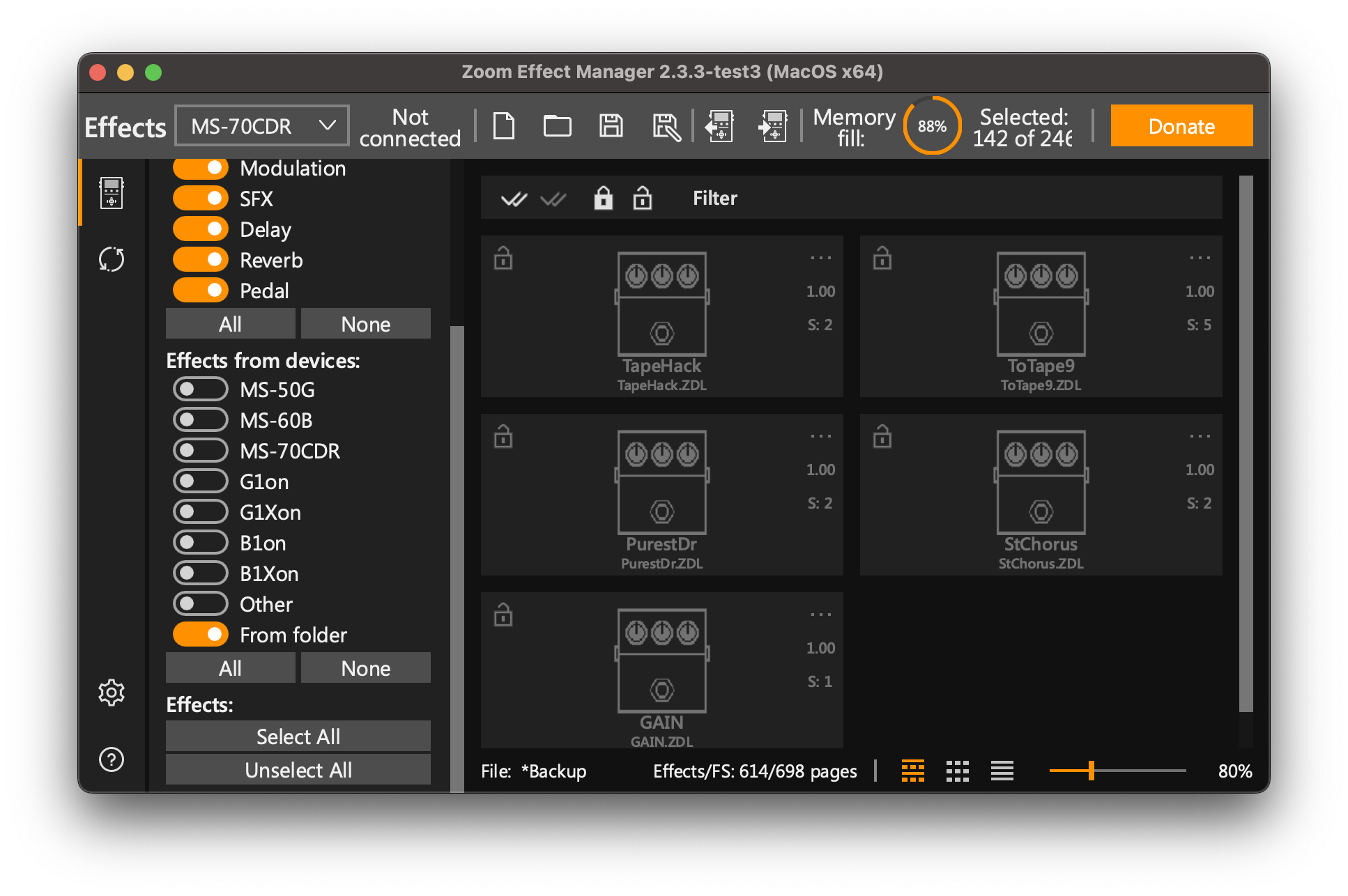
- In the effect source/filter area, enable
Effects from devices. - Enable
From Folder. - Add the desired custom effects and write them to the pedal.
“No data to display, check filters”
This is the most common report, and it is almost always one of the first two:
- The
From Foldersource is not enabled. Choosing the folder inSettingsonly tells Effect Manager where to look. The browser has separate source checkboxes –Effects from devicesandFrom Folder– and with neither ticked the list is empty and it says exactly this. Steps 5 and 6 above are not optional. - The pedal was connected after Effect Manager was opened. Connect first, then launch it.
- A category filter is hiding them. Every effect in this pack is in the Delay category. If the browser is filtered to another category they are there but not listed.
- The files are not actually ZDLs. See below – this bites Windows users in particular.
Check that your download is real (Windows especially)
Clicking a .ZDL in GitHub’s web interface and using Save as saves the HTML
page, not the file. The result has the right name and is useless. Use the
Download raw file button, or download the whole repository as a ZIP, or
git clone.
A genuine .ZDL from this pack:
- is between 5 KB and 23 KB – an HTML page is typically 100 KB or more
- begins with the bytes
00 00 00 00 53 49 5a 45(SIZEat offset 4). An HTML page begins with3C 21 44 4F(<!DO)
On Windows, certutil -f -encodehex Spiral.ZDL con 8 | more shows the first
bytes; or just check the size in Explorer, which is enough to catch it.
Also make sure Explorer is not hiding extensions (View > Show > File name
extensions). A file saved as Spiral.ZDL.txt looks correct in a folder listing
with extensions hidden and will never be read.
Notes
Back up your current effect list before writing. Current release effects target ZDL-based MultiStomp pedals and are only hardware-tested on MS-70CDR firmware 2.10 so far.
If an effect does not appear, confirm that Zoom Effect Manager is reading the
same dist/ folder shown in this repo and that the From Folder source is
enabled.
On MS-70CDR firmware 2.10, a Drive-category custom effect can flash correctly
but stay hidden in the pedal’s on-device FX browser if no stock Drive effect is
installed. If ToTape9.ZDL writes successfully but does not appear while
scrolling effects, also install at least one stock Drive effect. With a stock
Drive effect present, the custom Drive effect has been reported visible.
Effect Manager thumbnails
The dist/ folder includes a matching PNG for every effect. Keep the PNG beside
its ZDL with the same basename, for example Stasis.ZDL and Stasis.png.
Restart Effect Manager after adding or changing these files; it reads the folder
at startup. Thumbnails do not require rewriting effects to the pedal.
To regenerate thumbnails from the actual embedded artwork:
python3 build/make_em_thumbnails.py
Icons use the bundled Effect Manager format: 128×96 RGBA with opaque black artwork and a transparent background. Opaque RGB images can display as solid tinted blocks. The cover inside preserves the pedal display proportions. The PNGs affect Effect Manager only; the ZDL already contains the pedal’s own artwork. See the Effect Manager folder documentation.